Client Script
The Client Script feature allows you to write SQL-like queries to filter, transform, or refine a dataset before it is rendered in a widget. This provides greater flexibility and helps reduce the amount of raw data passed to the visualization.
Purpose
-
Apply row-level filters to datasets.
-
Rename or transform columns.
-
Select only the required fields.
-
Perform simple calculations before display.
How It Works
The client script runs on the selected dataset and behaves like a lightweight SQL query engine. The ? acts as a placeholder for the dataset.
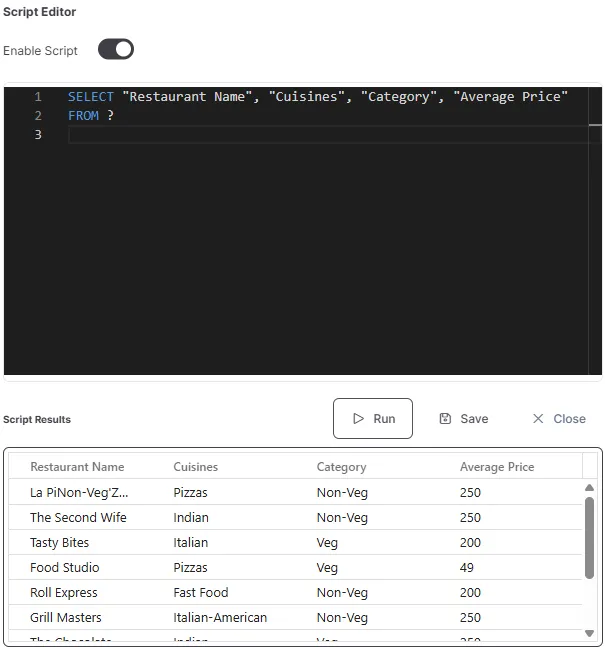
Example 1 – Select specific columns:
SELECT “Restaurant Name”, “Cuisines”, “Category”, “Average Price” FROM ?
Example 2 – Filter rows:
SELECT “Restaurant Name”, “Cuisines”, “Category”, “Average Price” FROM ? WHERE “Category” = ‘Non-Veg’
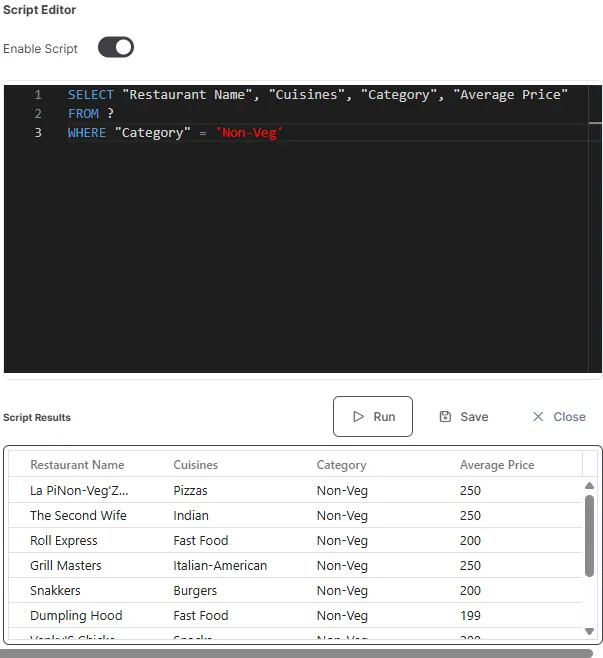
This filters the dataset to display only rows where Category is Non-Veg.
This extracts only the required fields from the dataset.
Example 3 – Apply simple transformation:
SELECT “Location”, CAST(“Average Price” AS DECIMAL(10,2)) * 1.18 AS “Price with GST” FROM ?;
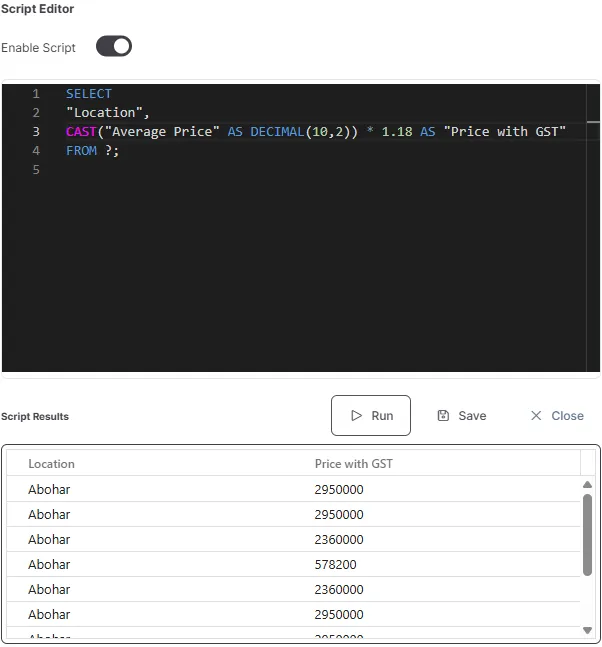
This creates a new column (Price with GST) by applying a transformation.
Key Notes
-
Always use ? as a placeholder for the dataset.
-
SQL syntax is case-insensitive, but column names must match exactly.
-
Complex joins or nested queries are not supported—keep scripts simple.
-
Errors in the script may cause the widget to fail to load.
Use Cases
Narrowing down a dataset for faster rendering.
Pre-calculating values like tax, percentages, or derived metrics.
Restricting results to a particular segment (e.g., a category or date range).
Client Script Actions
The Client Script editor provides three action buttons to help you manage and execute your queries effectively.
Run
- Executes the client script on the selected dataset.
- Instantly previews the filtered or transformed data in the widget.
- Useful for validating the query before saving.
- If the script contains errors, the widget will fail to load and display an error.
Save
- Saves the current client script configuration.
- The saved script is automatically applied whenever the widget is loaded.
- Use this after verifying the output using the Run button.
Cancel
- Discards any unsaved changes made to the client script.
- Reverts the script to the last saved state.
- Does not affect the currently saved or applied query.