Retry
Retry Request is a way to re-run an existing request. select retry, when a report to be run again with the same parameter values.
To retry request you need to follow below steps:
To retry a request a user should select a request (make sure Checkbox selected), and click on  as shown in the figure below:-
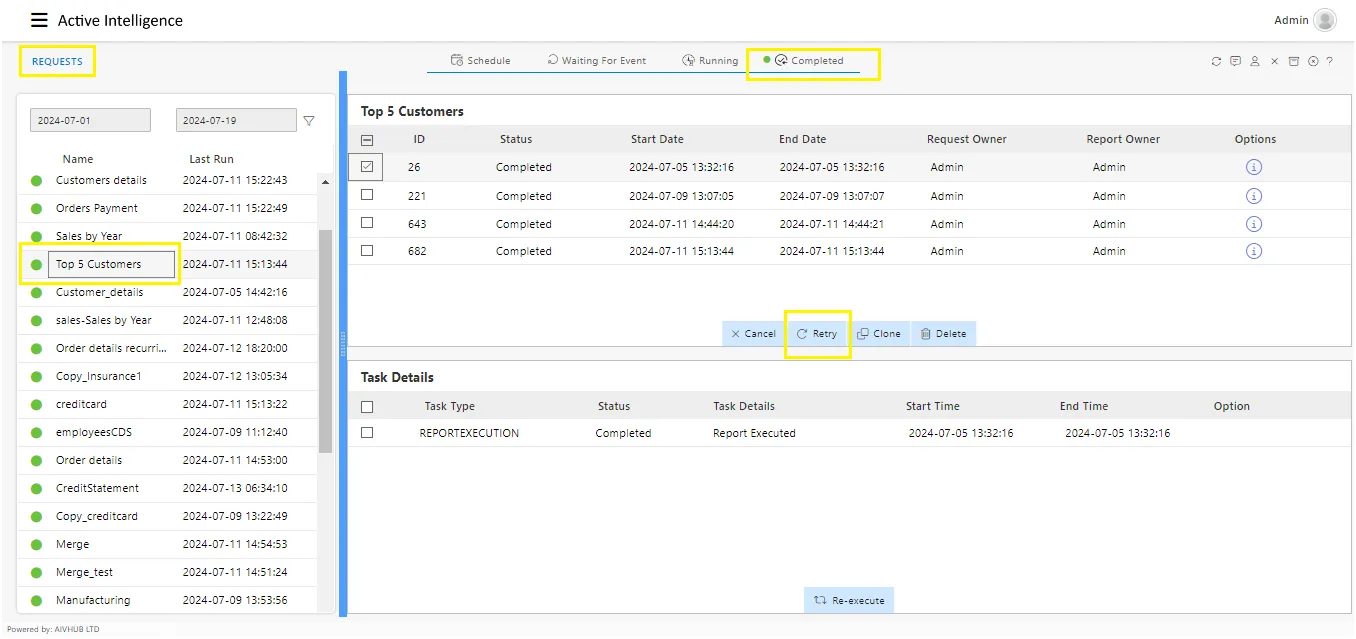
Here as you can see a report has completed to execute and hence we will click on to execute it again.
As a result of this, the following dialog box will open:-
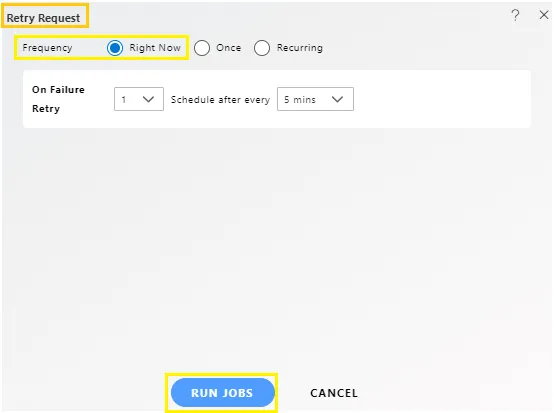
You can schedule your reports for different times as follows:
Right now: View the report output immediately.
Once: Run the report once at a specific time on a chosen day.
Recurring: Run the report multiple times within an hour, day, week, month, or year.
For a detailed description of report scheduling, refer to the Reports section of the Documents. Click on “Schedule Reports” to access it.
Click on to re-run the request.

In case of any further help, the user can click on the icon to access the AIVHUB help documents.

If the user wants to cancel the retry request, he can do this by clicking on the  next to or by clicking on button next to the icon.

In this manner you can re-run a request in the AIV application.