AIV Configuration
AIV Configuration
This document provides a comprehensive guide to all configuration settings available in AIV. The configuration interface is divided into several sections, each managing different aspects of the system.
AIV Configuration: This video contains how to use AIV Configuration in AIV.
The AIV Configuration section encompasses all configurations related to AIV, including General Configurations, External Security, BIRT Configurations, Archive, Purge, House keeping, Email Configurations, SSO Configuration and Report Display Messages.
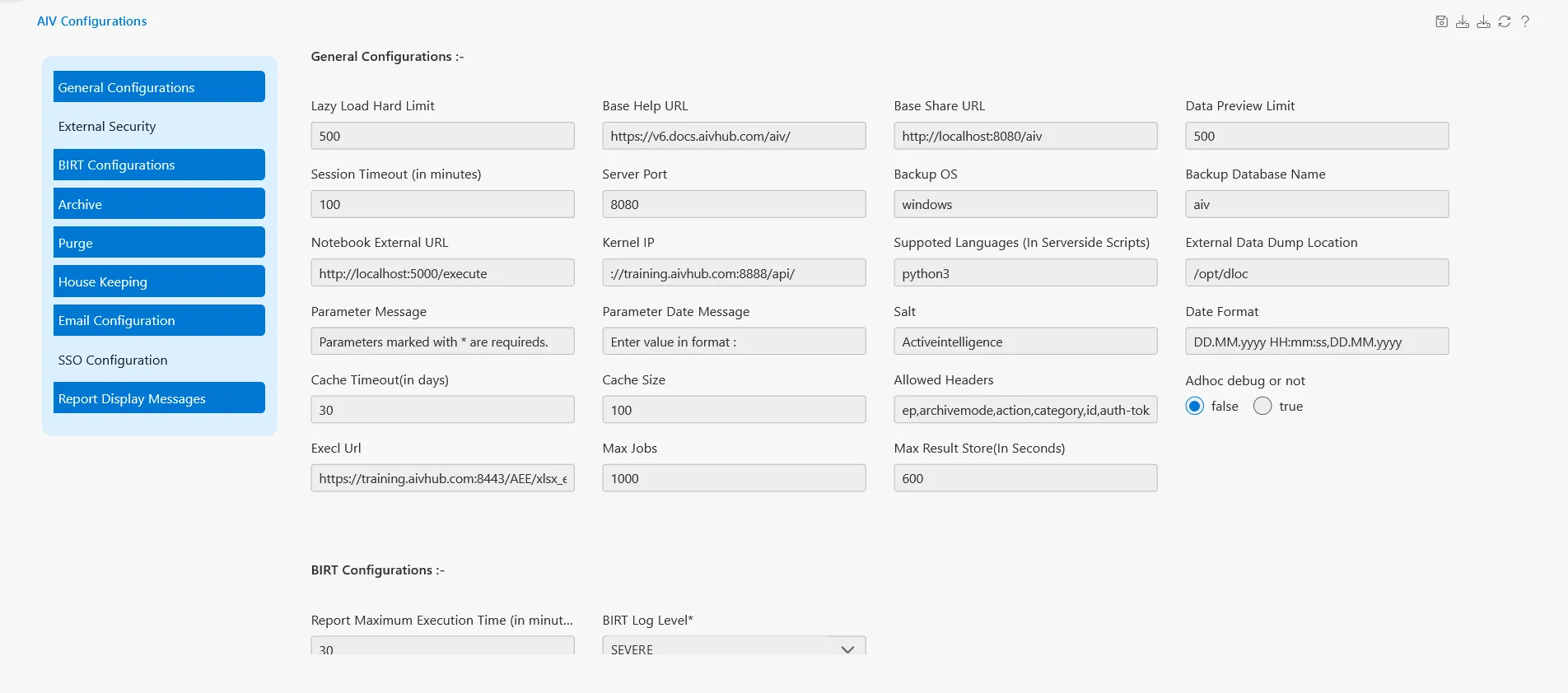
General Configurations
The General Configurations section contains the core settings for AIV system behavior.
System Limits and URLs
Lazy Load Hard Limit
- Field: Lazy Load Hard Limit
- Default Value: 500
- Description: Sets the maximum number of records that can be loaded at once using lazy loading. This prevents performance issues by limiting the data fetched in a single request.
Base Help URL
- Field: Base Help URL
- Example:
https://v6.aops.ai/hub.com/aiv/ - Description: The base URL for the help documentation system. This URL is used to generate links to help pages throughout the application.
Base Share URL
- Field: Base Share URL
- Example:
http://241.217.80:8081/aiv - Description: The base URL used for generating shareable links to reports, dashboards, and other AIV resources.
Data Preview Limit
- Field: Data Preview Limit
- Default Value: 100v
- Description: Limits the number of rows displayed in data preview windows to improve performance and usability.
Server Configuration
Session Timeout (in minutes)
- Field: Session Timeout (in minutes)
- Default Value: 100
- Description: Defines how long a user session remains active without activity before automatic logout. Value is specified in minutes.
Server Port
- Field: Server Port
- Default Value: 8080
- Description: The port number on which the AIV server listens for incoming connections.
Backup OS
- Field: Backup OS
- Default Value: windows
- Description: Specifies the operating system type for backup operations. Valid values include
windows,linux, etc.
Backup Database Name
- Field: Backup Database Name
- Default Value: aiv
- Description: The name of the database to be backed up during backup operations.
External Integration
Notebook External URL
- Field: Notebook External URL
- Example:
http://localhost:5000/execute - Description: URL endpoint for external notebook execution service integration, typically used for Python or Jupyter notebook execution.
Kernel IP
- Field: Kernel IP
- Example:
http://204.168.185.46:8097 - Description: IP address and port of the kernel server used for executing computational tasks.
Auth Token
- Field: Auth Token
- Example:
aivhub - Description: Authentication token used for secure communication with external services and APIs.
Supported Languages (In Serverside…)
- Field: Supported Languages (In Serverside…)
- Default Value: python3
- Description: Comma-separated list of programming languages supported for server-side script execution.
Data Management
External Data Dump Location
- Field: External Data Dump Location
- Default Value:
/opt/dloc - Description: File system path where external data dumps and exports are stored.
Parameter Message
- Field: Parameter Message
- Default Value:
Parameters marked with * are required - Description: Custom message displayed to users regarding parameter requirements in reports and dashboards.
Parameter Date Message
- Field: Parameter Date Message
- Default Value:
Enter value in format : - Description: Instructional message shown to users when entering date parameters, guiding them on the expected format.
Salt
- Field: Salt
- Default Value:
Activeintelligence - Description: Cryptographic salt value used for password hashing and security operations. Should be kept confidential.
Storage and Format
Date Format
- Field: Date Format
- Default Value:
DD/MM/yyyy HH:mm:ss,DD/MM/yy - Description: Default date format pattern used throughout the application for displaying and parsing dates.
Temporary Storage
- Field: Temporary Storage
- Default Value:
C:/AIS/execution/ - Description: Directory path for storing temporary files during report execution and data processing.
Birt Locale
- Field: Birt Locale
- Default Value:
en - Description: Locale setting for BIRT (Business Intelligence and Reporting Tools) engine, affecting number formatting, date formats, and language.
Debugging and Development
Adhoc debug or not
- Field: Adhoc debug or not
- Type: Radio button (false/true)
- Default Value: false
- Description: Enables or disables debug mode for ad-hoc queries and reports. When enabled, provides detailed logging and error information.
Performance Settings
Allow Headers
- Field: Allow Headers
- Default Value:
ep,archiveMode,code,action,category,id, - Description: Comma-separated list of HTTP headers allowed in requests. Used for CORS (Cross-Origin Resource Sharing) configuration.
Cache Timeout (in days)
- Field: Cache Timeout (in days)
- Default Value: 30
- Description: Number of days before cached data expires and needs to be refreshed.
Cache Size
- Field: Cache Size
- Default Value: 1000
- Description: Maximum number of items that can be stored in the application cache.
Excel Url
- Field: Excel Url
- Example:
http://localhost:8080/AEF/xlsx_export - Description: URL endpoint for Excel export functionality.
Job Management
Max Jobs
- Field: Max Jobs
- Default Value: 1000
- Description: Maximum number of concurrent jobs that can be executed by the system.
Max Result Store (in Seconds)
- Field: Max Result Store (in Seconds)
- Default Value: 600
- Description: Duration in seconds for which job results are stored before being cleaned up.
Is Embed Token
- Field: Is Embed Token
- Default Value: true
- Description: Determines whether authentication tokens should be embedded in URLs for embedded reports and dashboards.
AI Integration
Open AI Token
- Field: Open AI Token
- Default Value: 4000
- Description: Token limit for OpenAI API requests. Controls the maximum number of tokens used in AI-powered features.
Open AI Engine
- Field: Open AI Engine
- Default Value:
gpt-4o - Description: Specifies the OpenAI engine/model to use for AI-powered features like AI Buddy.
Open AI Key
- Field: Open AI Key
- Description: API key for authenticating with OpenAI services. Required for AI-powered features.
AIV Clustering
The AIV Clustering section configures load balancing and high availability settings for distributed AIV deployments.
Cluster Configuration
AIV Clustering
- Field: AIV Clustering (Checkbox)
- Description: Enable or disable clustering mode. When enabled, AIV can operate in a distributed environment with multiple instances.
Cluster Name
- Field: Cluster Name
- Default Value: AIV
- Description: Unique identifier for the cluster. All instances in the same cluster should use the same cluster name.
Instance Name
- Field: Instance Name
- Default Value: AIV
- Description: Unique name for this specific AIV instance within the cluster.
Ip Address of Server
- Field: Ip Address of Server
- Example:
localhost:5701 - Description: IP address and port of the current server instance. Used for inter-node communication.
Port Range
- Field: Port Range
- Example:
5703-5720 - Description: Range of ports available for cluster communication. The system will automatically select available ports within this range.
Task Management
Total Tasks
- Field: Total Tasks
- Default Value: 10
- Description: Maximum number of tasks that can be processed simultaneously by this instance.
Max backoff time
- Field: Max backoff time
- Default Value: 60000
- Description: Maximum backoff time in milliseconds before retrying a failed task. Used in exponential backoff strategy.
Multiplier
- Field: Multiplier
- Default Value: 2
- Description: Multiplier factor for exponential backoff calculation when retrying failed tasks.
Connection timeout
- Field: Connection timeout
- Default Value: 5000
- Description: Timeout in milliseconds for establishing connections between cluster nodes.
Interval
- Field: Interval
- Default Value: 5000
- Description: Interval in milliseconds between cluster health checks and synchronization operations.
Email Configuration
The Email Configuration section manages SMTP settings for sending emails from AIV.
Email Configuration Toggle
Email Configuration
- Field: Email Configuration (Checkbox)
- Description: Enable or disable email functionality. When disabled, the system will not send any emails.
SMTP Server Settings
SMTP Host
- Field: SMTP Host
- Example:
send.one.com - Description: Hostname or IP address of the SMTP mail server used for sending emails.
SMTP Port
- Field: SMTP Port
- Default Value: 587
- Description: Port number for SMTP server connection. Common values:
- 25: Standard SMTP (usually blocked by ISPs)
- 587: SMTP with STARTTLS (recommended)
- 465: SMTP over SSL
Authentication
Username
- Field: Username
- Example:
temporary@opnbi.com - Description: Username for authenticating with the SMTP server. Usually an email address.
Password
- Field: Password
- Type: Password (masked)
- Description: Password for SMTP authentication. Stored securely and masked in the interface.
Security Settings
SSL
- Field: SSL
- Default Value: false
- Description: Enable SSL (Secure Sockets Layer) encryption for SMTP connection. Use for port 465.
TLS
- Field: TLS
- Default Value: true
- Description: Enable TLS (Transport Layer Security) encryption for SMTP connection. Use for port 587 with STARTTLS.
Auth Req
- Field: Auth Req
- Default Value: true
- Description: Specifies whether the SMTP server requires authentication. Most modern SMTP servers require authentication.
Protocol Required
- Field: Protocol Required
- Default Value: true
- Description: Indicates whether a specific protocol (SSL/TLS) is required for the connection.
Protocols
- Field: Protocols
- Default Value:
TLSv1.2 TLSv1.3 - Description: Space-separated list of supported TLS protocol versions. Restricts connections to secure protocol versions.
Email Sender Information
Sender Name
- Field: Sender Name
- Default Value:
AIV System Generated - Description: Display name shown as the sender in outgoing emails.
Sender Email
- Field: Sender Email
- Example:
temporary@opnbi.com - Description: Email address used as the “From” address in outgoing emails. Should match the authenticated SMTP account.
Advanced Settings
Email Looping
- Field: Email Looping
- Default Value: false
- Description: Prevents email loops by blocking emails to the sender address. Useful for preventing infinite email chains.
Configuration Best Practices
Security Recommendations
- Change Default Salt: Always change the default salt value in production environments
- Secure Passwords: Use strong passwords for SMTP authentication
- Use TLS: Enable TLS for email communication to encrypt credentials
- Protect API Keys: Keep OpenAI API keys and auth tokens confidential
Performance Optimization
- Cache Settings: Adjust cache size and timeout based on your data update frequency
- Session Timeout: Balance security and user convenience when setting session timeout
- Max Jobs: Set based on server capacity and expected concurrent users
- Lazy Load Limit: Lower values improve initial load time but may require more user interactions
Clustering Considerations
- Consistent Configuration: Ensure all cluster nodes have identical configuration except for instance-specific settings
- Port Ranges: Ensure port ranges don’t overlap with other services
- Network Connectivity: Verify all cluster nodes can communicate on specified ports
- Load Distribution: Adjust Total Tasks based on individual node capacity
Email Configuration Tips
- Test Configuration: Use the test email feature to verify settings before deployment
- Port Selection: Use port 587 with TLS for best compatibility
- Sender Reputation: Use a verified domain email address to avoid spam filters
- Protocol Versions: Keep TLS protocols updated to maintain security
Troubleshooting
Common Issues
Email Not Sending
- Verify SMTP host and port are correct
- Check username and password
- Ensure firewall allows outbound connections on SMTP port
- Verify TLS/SSL settings match server requirements
Clustering Issues
- Confirm all nodes use the same cluster name
- Check network connectivity between nodes
- Verify port ranges are available and not blocked by firewall
- Review logs for connection timeout errors
Performance Problems
- Increase cache size if frequent data access
- Adjust max jobs based on server resources
- Review lazy load limits for large datasets
- Monitor session timeout for optimal user experience
AI Features Not Working
- Verify OpenAI API key is valid and has sufficient credits
- Check Open AI Token limit is appropriate for your use case
- Ensure network connectivity to OpenAI services
- Review OpenAI engine compatibility