AIV Forecast Buddy
The AIV Forecast Buddy leverages AI to automatically generate accurate forecasts and predictive insights from your datasets. It intelligently analyzes historical data, identifies trends, and applies suitable forecasting models to project future outcomes — helping you make data-driven decisions with ease.
Key Features
-
Multi-Variable Forecasting: Predict multiple metrics simultaneously (e.g., sales + marketing spend).
-
Expanded Confidence Intervals: Get uncertainty ranges (70%, 75%, 80%, 85%, 90%, 95%, 99%) for comprehensive risk assessment.
-
Automatic Seasonality Detection: Identifies monthly, quarterly, and weekly patterns to improve forecast accuracy.
-
Flexible Time Formats: Works with years, standard dates, months, and custom time periods.
-
Smart Model Selection: Automatically chooses the best forecasting algorithm for your data.
-
Robust Data Handling: Works with small datasets and mixed data types, ensuring reliable results.
-
Report Generation: Automatically generates a clear and detailed forecast report for review, sharing, or documentation.
Steps to Use the AIV Forecast Buddy
-
Hover over the widget, and you will see the
 icon. Click on it and select Forecast.
-
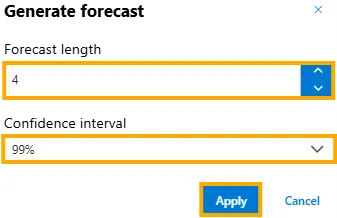
The Generate Forecast panel will appear. Set the Forecast Length and Confidence Interval according to your choice, then click Apply to generate the forecast.
Example
-
The Forecast Length is set to 4 and the Confidence Interval to 99%.
-
After clicking Apply, the forecast will start loading. A popup, as shown below, will be displayed:

-
Click the
 icon on the widget to view the report.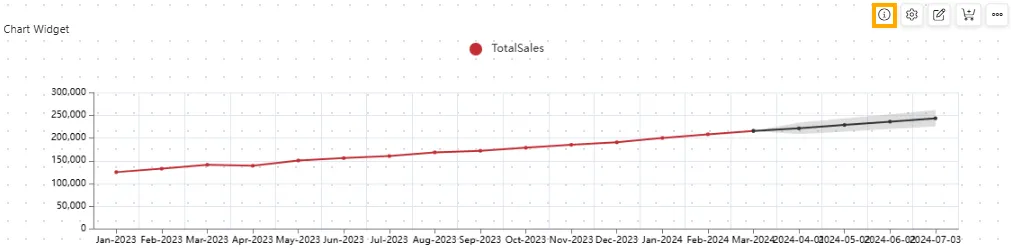
-
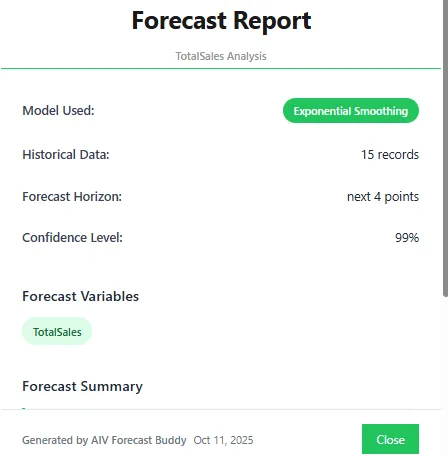
Once the report opens, click the Close button to close it.
Summary
The AIV Forecast Buddy simplifies predictive analysis by automating the forecasting process.
It intelligently identifies trends, suggests the best visualizations, and allows customization through natural language.
By providing AI-driven predictions, it enables users to make informed decisions, plan ahead, and visualize future outcomes with confidence.