AIV 6 Docker Setup Requirements and Installation Guide (Linux)
This guide walks you through downloading, installing, and configuring AIV 6 using Docker on a Linux environment.
What You’ll Learn
- How to download and extract the AIV 6 Docker package
- How to run AIV using Docker Compose
- Where to access AIV after installation
Prerequisites
Before you begin, ensure you have:
| Requirement | Details |
|---|---|
| Operating System | Linux (Ubuntu, CentOS, Debian, etc.) |
| Docker | Docker Engine installed |
| Docker Compose | Docker Compose plugin installed |
| Memory | Minimum 16 GB RAM recommended |
| CPU | Minimum 8 CPU cores recommended |
Step 1: Download the AIV 6 Docker Package
-
Go to the AIV download page.
-
Click Download.
-
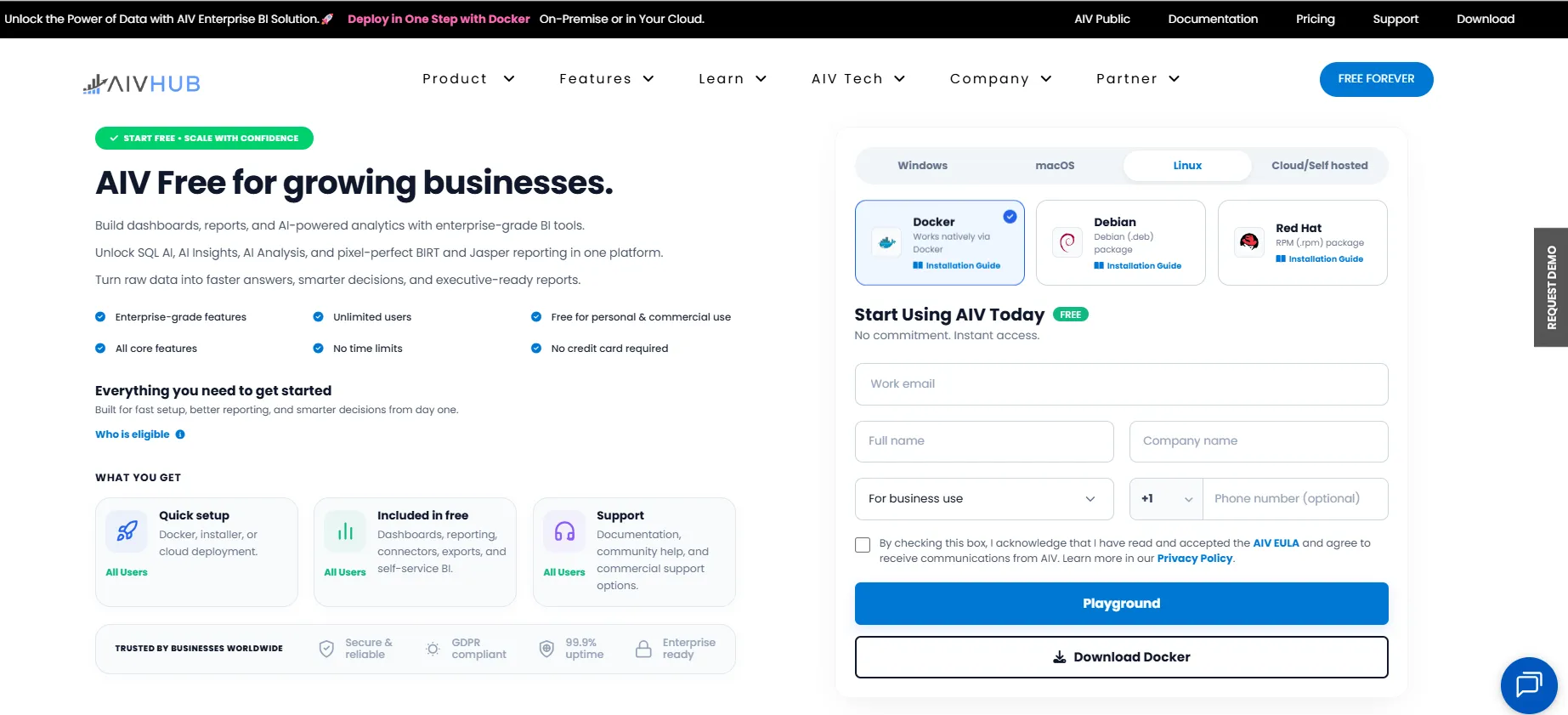
The website automatically detects your operating system and selects the appropriate platform (Windows, macOS, or Linux).
-
Verify that the correct platform is selected (Linux in this case).
-
If you are installing AIV using Docker on Linux, ensure that Docker is selected as the installation method.
-
Enter the required information in the download form:
- Enter your Work Email in the email field.
- Click Get OTP.
- An OTP will be sent to the email address you provided.
- Enter the 6-digit OTP in the Enter OTP field.
- Click Verify OTP.
- If the OTP expires before verification, click Resend OTP to receive a new OTP.
- After successful verification, the message “Email verified successfully!” is displayed, and you can proceed with the remaining fields.
- Enter your Full Name.
- Enter your Company Name.
- Select For business use from the Usage Type dropdown.
- Select your Country Code and enter your Phone Number (optional).
-
Select the checkbox to confirm that you have read and accepted the AIV EULA.
-
By selecting the checkbox, you also agree to receive communications from AIV.
-
Click Download Docker and wait for the Docker package to finish downloading. Once the download is complete, extract the ZIP file to a folder of your choice (for example,
/opt/aiv/docker-aiv-main).
Step 2: Run Docker Compose
-
Open your terminal and log in to your Linux server.
-
Navigate to the directory where you extracted the AIV package. For example, if you extracted it to
/opt/aiv/docker-aiv-main:cd /opt/aiv/docker-aiv-main -
Run the following command to start AIV and all its associated services in detached mode:
docker compose up -d -
Docker will begin pulling the required images (such as
aiv-ai,aiv,pqadmin, andpostgres) and starting the containers. -
Wait for all containers to start. When you see messages indicating the containers are
StartedandHealthy, the setup is complete.
Access AIV
Once the containers are successfully running, open your web browser and go to:
http://<your-server-ip>:8080/aiv(If you are running this locally on a Linux desktop, you can use http://localhost:8080/aiv)
You can now start using AIV.
System Requirements Summary
| Component | Minimum |
|---|---|
| OS | Linux |
| Docker | Docker Engine & Compose |
| RAM | 16 GB |
| CPU | 8 cores |
Important Notes
- Ensure your user has sufficient permissions to run Docker commands, or run them as
root(usingsudo). - To stop the application, you can run
docker compose downfrom within the extracted directory.